
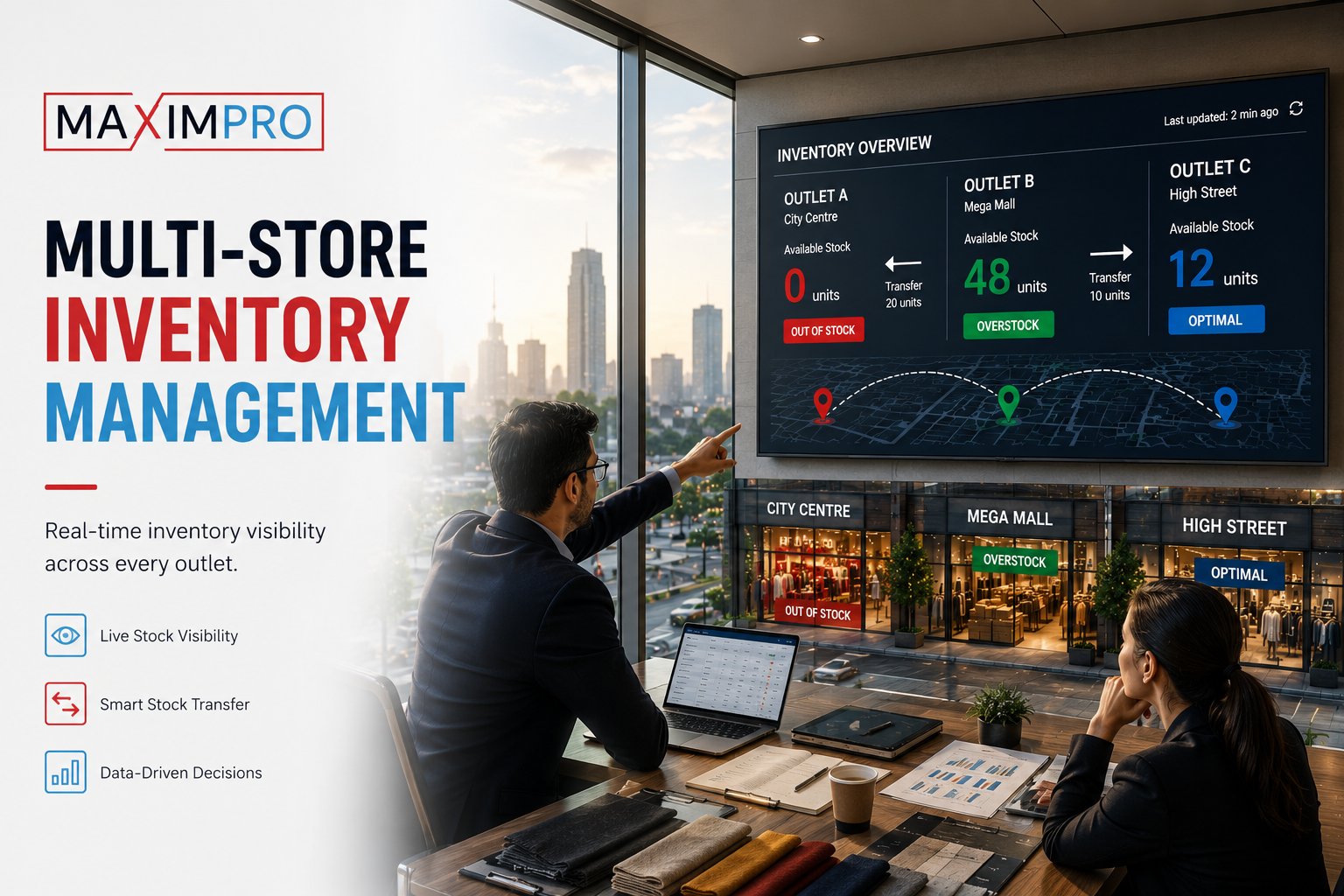
Outlet A is out of your fastest-moving product on a Friday afternoon. Outlet B, twelve kilometres away, has three weeks of the same item sitting in the stockroom. And nobody in your organisation knows — because stock is tracked separately in each location, reconciled at month-end (if at all), and corrected only after the missed sales already show up as a gap in the P&L.
This is the silent cost of managing multi-store inventory outlet by outlet. It is not a minor inefficiency. Global research estimates inventory distortion — stockouts and overstock together — costs retail approximately $1.73 trillion annually. GCC mid-market retailers are not immune to this dynamic, and for a chain running three to fifteen outlets, the impact is disproportionately large because there is rarely a dedicated inventory controller watching every branch in real time.
Multi-store inventory management is the operational answer to this problem. This post explains what it actually does, why manual approaches break down at scale, and how MaximPro implements it across outlets in India and the GCC.
The multi-store inventory problem nobody talks about publicly
The stockout-overstock mismatch is visible in hindsight — it shows up in shrinkage reports, in the buying manager’s frustrated calls, in the cash tied up in slow-moving SKUs at one branch while another branch turns customers away. What is less visible is the operational process that causes it: stock tracked in isolated systems, with no shared product catalog, no automated reorder signal, and no formal workflow for moving stock between locations.
The cost takes three forms. Missed sales when a customer visits a stocked-out outlet and does not come back. Tied-up capital when overstock sits in a branch stockroom for weeks, funded by working capital that could serve better purposes. And for food retailers, perishable waste when excess stock at one outlet expires because nobody moved it in time to a branch running low.
None of this is inevitable. It is what happens when inventory management is not centralised — and real-time inventory across outlets is the specific mechanism that eliminates it.
What multi-store inventory management actually does
Centralised multi-store inventory management is not a reporting tool that shows you last night’s stock levels from each outlet. It is a live operational layer that does five things simultaneously:
- One master product catalog, synced to every outlet. A single SKU list — unified product names, prices, units of measure, and tax classifications — pushed to all branches. No more outlet A calling it "Mineral Water 500ml" and outlet B calling it "WTR-500." Bulk import handles up to 50,000 SKUs, loaded once and available chain-wide from day one.
- Real-time stock levels by outlet or chain-wide. The HQ dashboard shows current stock at every location at any moment — not batch-synced at midnight, but updated as sales, returns, and receiving events happen. This is the visibility that makes intelligent decisions possible.
- Formal inter-store transfer workflow. When outlet A needs stock from outlet B, the process runs through the system: request → approval by HQ or the supplying outlet → dispatch → receiving confirmation. Not a WhatsApp message, not a verbal agreement that gets forgotten, but a documented movement that updates both outlets’ inventories the moment it is confirmed.
- Automatic low-stock alerts. When any outlet hits its reorder point for a SKU, the system triggers an alert — to the purchasing manager, the outlet manager, or both, depending on configuration. The branch does not have to notice and escalate. The system notices for them.
- Automated goods receiving with validation. When a supplier delivery arrives at any outlet, the receiving staff confirms against the open purchase order in the system. Quantities are validated before the PO is closed, and inventory updates centrally at the moment of confirmation — not at end of day.
Taken together, these functions turn multi-store inventory from a reconciliation exercise into a live operational feed. For a deeper look at how these capabilities sit within a full retail chain management for multi-outlet retailers platform, the MaximPro solution overview covers the broader module set.
Why checking each store separately does not scale
At two outlets, a morning phone call between managers works. It takes five minutes and catches most discrepancies before the day begins. At five outlets, that morning call becomes a forty-five-minute circuit that still misses discrepancies because each manager is reporting from memory or last night’s closing count, not from a live system. At ten outlets, manual reconciliation introduces errors that compound across locations — and those errors surface in the P&L two to four weeks later, by which time the root cause is impossible to isolate.
The breakpoint is not a specific number of outlets. It is the moment when the volume of daily inventory events — sales, transfers, returns, receiving — exceeds what a person checking periodically can track without a system. For most retail chains, that breakpoint arrives somewhere between three and five locations.
The answer is not better spreadsheets or more disciplined phone calls. The answer is a system where the data moves automatically and the manager’s job shifts from collecting information to acting on it.
The inventory–POS link: why they have to be the same system
Retail chains that use a separate POS and a separate inventory system discover the same problem within weeks: the two systems drift. A return processed in the POS is not reflected in inventory until someone manually enters it. An inter-store transfer recorded in the inventory system does not update the POS stock count until the nightly sync. That lag, multiplied across dozens of transactions per day, accumulates into material discrepancies.
The technical answer is integration — an API layer that keeps both systems talking. But APIs require maintenance, fail during updates, and introduce a new category of error: the sync that ran partially, leaving one system one day ahead of the other.
MaximPro takes a different approach: billing and inventory live in the same platform. Every sale, return, inter-store transfer, and goods receipt updates inventory at the moment it is recorded, with no integration layer to maintain. The POS and the inventory ledger share a single data model — they cannot drift because they are not separate systems. This is what makes inventory management for retail chains reliable enough to act on, rather than just reference.
For a full view of how billing, inventory, and multi-outlet management connect in the platform, see MaximPro’s inventory and procurement features.
How MaximPro handles inventory across multiple outlets
The MaximPro inventory module is built from the assumption that a retail chain is not a collection of independent stores — it is one business running across several locations, and inventory should reflect that.
- Bulk product import up to 50,000 SKUs. Load the full product catalog once. Every outlet receives it. Updates to pricing or product classification propagate chain-wide.
- Automated goods receiving with bill validation. Staff at any outlet scan or select items against the open PO. The system validates quantities before the receipt is confirmed. Central inventory updates in real time.
- Inter-store transfer workflow built into the dashboard. HQ initiates or approves transfers. The dispatching outlet records the outbound movement; the receiving outlet confirms inbound. Both inventory records update at the moment of confirmation.
- Wireless stock-taking via the mobile app. Periodic stock audits at any location run on a mobile device — no paper count sheets, no manual re-entry. Audit results sync directly to the central system. MaximPro’s mobile app for on-the-go inventory management supports both audit and reporting functions from the shop floor.
- 150+ reports, filterable by outlet or chain-wide. Stock movement, slow movers, reorder status, inter-store transfer history — every view can be filtered to a single outlet or aggregated across the chain.
- AI-based sales prediction that feeds procurement. Demand forecasting surfaces likely reorder requirements by SKU and outlet, reducing the reliance on a buyer’s intuition for replenishment decisions.
On inventory visibility, MaximPro also integrates with VIZO361’s AI cash-theft detection integrated with POS inventory — so unusual cash variances and stock discrepancies can be investigated together, not in separate systems. This matters for loss prevention in high-footfall retail environments.
Multi-store inventory in the GCC context
For retail chains operating in Oman, the UAE, or across both markets, multi-store inventory management carries compliance requirements that a generic inventory tool typically does not address.
VAT-compliant stock valuation. Inventory must reconcile with the VAT ledger — stock received and sold has to map correctly to the VAT return. MaximPro is built for GCC VAT compliance, so inventory movements generate the correct tax records automatically rather than requiring a separate reconciliation at period-end.
Inter-store transfer documentation for audit purposes. Oman’s record-retention requirements extend to ten years for financial documents. Every inter-store transfer logged in MaximPro creates a documented audit trail — the request, the approval, the dispatch, the receiving confirmation — that satisfies this requirement without additional manual filing.
Multi-currency handling for chains spanning Oman and the UAE. A chain operating in both markets runs transactions in OMR and AED. Consolidated inventory reporting that aggregates across currencies needs the correct exchange-rate handling at the time of the transaction, not at the time of the report.
Arabic and English product naming. Bilingual product catalogs — where each SKU carries both an Arabic and an English name — support customer-facing display and internal reporting without maintaining two separate product databases.
Frequently Asked Questions
How does a POS system track inventory across multiple stores?
A POS with built-in multi-store inventory maintains a shared product catalogue and a central stock ledger. Every transaction at any outlet — sale, return, inter-store transfer, or goods receipt — updates that central ledger in real time. Systems that handle this through a separate integration layer introduce sync lag and failure risk; platforms like MaximPro with a unified data model eliminate the gap entirely because billing and inventory share the same underlying record.
What is the best inventory management software for retail chains in Oman and India?
The right answer depends on geography and chain size. For GCC retailers, VAT compliance and Arabic-language support narrow the field significantly. For chains between three and twenty outlets, the core criteria are: real-time stock visibility across every outlet, a formal inter-store transfer workflow, and a POS that shares the same inventory layer without requiring a separate integration.
How do I manage stock transfers between retail outlets?
The structured approach is a request-approve-dispatch-receive workflow inside the inventory system, where each stage is logged and updates both outlets’ stock counts simultaneously. Informal transfers via phone call or message create undocumented stock movements that appear as unexplained variances in the next stock audit — and make it impossible to identify whether the gap is a transfer, a theft, or a receiving error.
Does MaximPro update inventory in real time across all outlets?
Yes. Sales, returns, inter-store transfers, and goods receipts all update the central inventory ledger at the moment they are recorded — not in a nightly batch. The HQ dashboard reflects current stock across all outlets without waiting for a sync cycle, which means purchasing and operations decisions are based on what is actually on the shelf, not what was there this morning.
How does multi-store inventory management handle VAT-compliant stock records in Oman?
In Oman, inventory must reconcile with the VAT ledger — stock received and sold needs to map correctly to VAT return figures. MaximPro is built for GCC VAT compliance, so inventory movements automatically generate the correct tax records without a separate period-end reconciliation step. Every inter-store transfer also creates an audit trail that satisfies Oman’s 10-year record-retention requirement.
Multi-store inventory management is not a reporting upgrade. It is an operational shift from tracking stock after the fact — outlet by outlet, on your own schedule — to knowing stock across your entire chain in real time, with the workflow infrastructure to act on what you see.
If your chain is running three or more outlets and stock discrepancies are a recurring conversation, the right next step is to see how the system works on your own store type and SKU set. Book a MaximPro demo — we’ll walk through the multi-outlet inventory dashboard live, mapped to your category and outlet count.
MaximPro is a Proeffico product. For retail chains looking to extend inventory intelligence to loss prevention, VIZO361 pairs with MaximPro POS for AI-powered shrinkage detection across outlets.